

Last Updated September 2021
If you don’t already have a suitable keyboard for the IBM 5150, there are a few options.
However, be warned: there are a few things to watch out for because there are a variety of keyboard options (available from across many years and international markets), and not of all of those options work (even if they “should” work). In other words, be prepared for some trial and error in finding a keyboard.
One of the best and most comprehensive index of keyboard part numbers I’ve found is available here. Within this reference, search “5150” or “Set 1/XT”. As far as US or English layouts, the earliest part numbers are:
1501100  (1981, Model F, original)
1801449  (1983, Model F, this is what I have, color matches 5150 perfectly)
8654422  (1984, Model F)
8529297  (1986, Model F)
1390120  (1986, Model M, no LEDs, mine is not reliable with 5150/XT)
1390131  (1986, Model M, has LEDs)
1391401  (1987, Model M - Set 2/AT only, mine is not reliable with 5150/XT)
Other languages/layouts (French, Arabic, Spanish, German, etc.) will have other part numbers. They may function the same, but will have different labels on their keys.
Primarily you need a “Model F” 83-key keyboard with a “5-pin DIN” connector.” This is generally the most reliable option, but unless you have the same keyboard that your 5150 originally came with, they can be difficult to find.
Alternatively, some newer “Model M” keyboards also have this same 5-pin DIN connector. The Model M has a detachable connector cable, making it possible to swap in different cables to support different systems (like laptops, office PCs like certain special cash registers, or a variety of PC-clones). But unfortunately, this also means not all cable will work even if they are “5-pin DIN” or may only partially work. In addition, the Model M is also a 102-key keyboard, which means various keys will also never work. So again, the “Model F” is the preferred option to look for.
I don’t have too much advise on where to find a suitable Model F keyboard, except that they are still listed on eBay fairly often. There is also a functional modern replica Model F keyboard (see here), which will be brand new and essential identical to original the Model F. But these are likely made-to-order and will be expensive as well (and may not be exactly matched in color with the 5150 – it may be very close, but a replica keyboard won’t have “aged” the same as an original).
Things to watch for when ordering a 5150 keyboard:
- Double check part numbers (some may have missing labels, so it may be difficult to confirm)
- NOTE: Once the part number is confirmed, the year doesn’t really matter functionality wise, but older may in general be more “valuable” if the condition is very good.
- Double check the connector (that it is a round cylinder with 5-pins)
- That the keys are present and fairly clean (some are “parts only” and may have missing keys), and do carefully examine the keys and that none of the labels are blank; the “cap” over the keys is fairly easy to remove (so some people may take caps to fix other keyboards, then sell keyboards with a few missing caps — they still function fine, but the key label will be blank)
The original Model F is famous for being essentially the heaviest of keyboards, due to having quite a bit of metal (very rugged military-like feel). In addition, the 5150 Model F keyboard is the same exact keyboard that was used in the IBM Datamaster series (which was released one month before the 5150 and were, at the time, very expensive systems).
The table below is a highlight of the differences between the Model F and Model M keyboards:
| Model F | Model M |
| Function keys on the left. | Function keys along the top. |
| Rear stand is stood up by twisting handles on the side. | Rear stand is just pulled out on latches. |
| No indicator lights for the state of NumLock, ScrollLock, CapsLock. | Indicator lights at the top right above the number key pad. |
| No arrow keys (most software will accept 8/6/2/3 for Up/Right/Down/Left controls – if not, press NumLock to toggle the keypad state and try again). | Independent arrow keys from the NumPad. |
| Fixed attached cable. | Swappable cable (squeeze the sides of the cable connector to remove it gently). |
There are many other subtle rearrangements of keys between these models, the BACKSLASH ( \ ) key in particular.

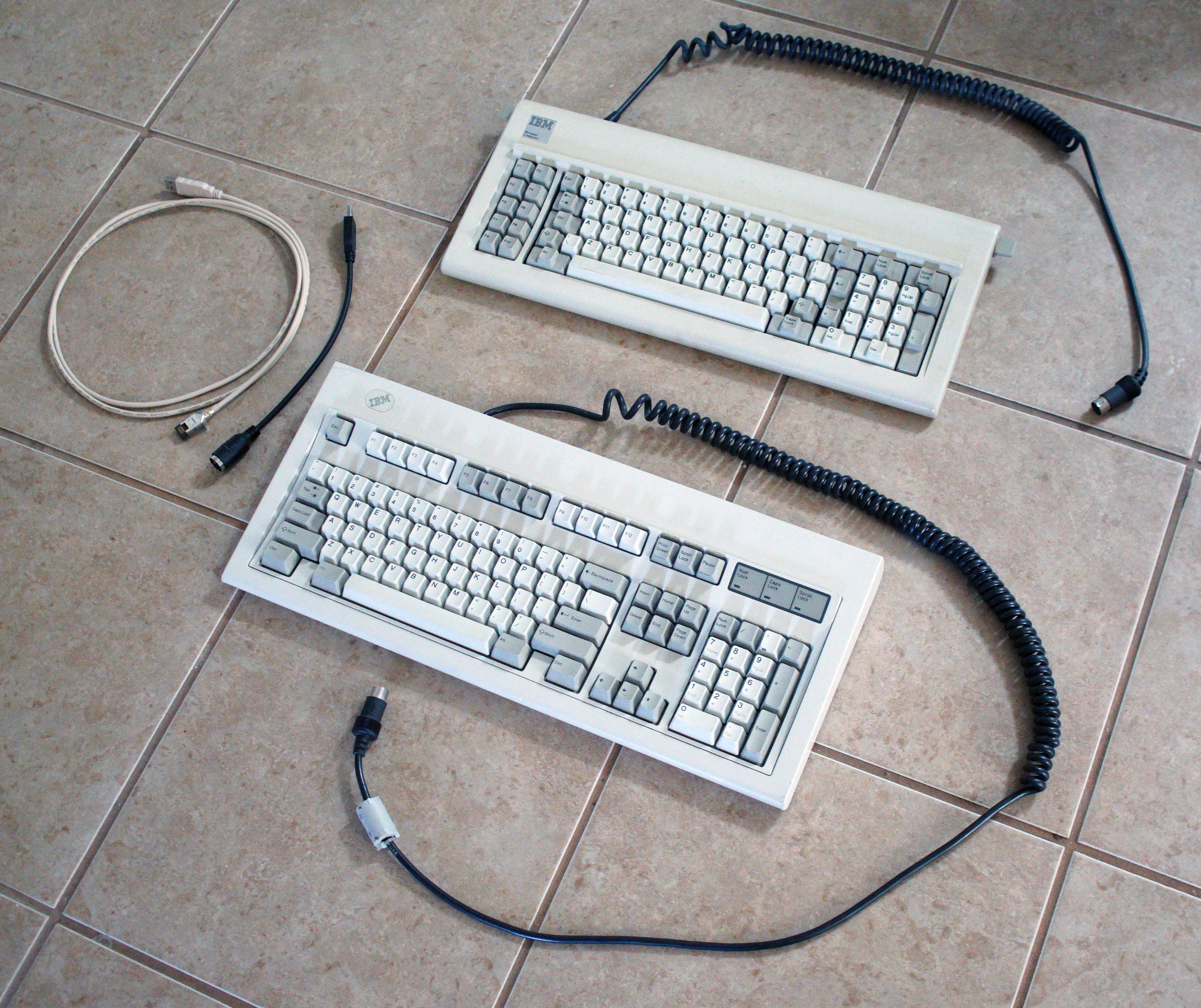


At least for my Model M, the cable is much longer than what is on the Model F. But again, the Model M made it easier to plug in different cables as needed.
BELOW: Here is what the 5-pin DIN connector looks like (it has 5 large pin connectors inside a metal cylinder). I’ve seen some Model F and Model M with more of a “serial port” or “game pad” style connector at the end, which might possibly be for certain specific markets or maybe certain IBM PC clone computers. For the IBM PC 5150, you want the 5-pin DIN style connectors.


Another option is to use a PS/2 to 5-pin DIN adapter. This lets you use a more modern keyboard on the 5150. See >>here<< for option from Monotech PCs.


The keyboard plugs into the back of the CPU enclosure case (where the connector is clearly labeled as “KEYBOARD“), which is rather unfortunate since that waste so much stretch on the keyboard cable (and would force users to remain rather close to those old CRT monitors). As I recall on my old Tandy PC-clone, they had smartly relocated the keyboard plug towards the front of the case.
On Model M Typing Random Characters (going “haywire”)
The Model M keyboard I have is not XT or 5150 compatible, but it DOES sometimes work. I’ve found if I just re-insert the cable many times, eventually some timing gets in sync, and the keyboard will just work as normal. When it doesn’t work, it goes “hay wire” and will just enter random keys in response to keypresses. However, I have plugged my Model M into a modern computer (using USB adapters) and it works fine there (meaning that there is no functional problem with the keyboard itself).
There was a thought that perhaps the detachable cable on my Model M keyboard was faulty. So, I ordered a brand new cable from UNICOMP (pckeyboards). I do trust that the cable is brand new and it is very well made. However, unfortunately, it did not fix the “goes haywire” problem for my 1991 Model M keyboard on the 5150. The experience was mostly the same: if I re-inserted the cable, sometimes it would work. But typically after any re-power up of the system, I’d get a “301” keyboard error indicator and the Model M would not work again (until re-inserting the cable multiple times). So it CAN work as a last resort option, but this is what I mean this not being a “reliable” option.
UPDATE September 2021: I tried another older Model M keyboard (1390120) with no LED lights, from 1986. I get similar results as the 1991 Model M keyboard, which is that it will sometimes work, but often gives “random” character responses. After booting up and at a MS-DOS prompt, if I re-insert the cable a few times, it seems to “sync up” and start working. But doing that during each boot-up is annoying and ultimately unreliable (wear out the connector). So again, a Model-M might work and might only work temporarily — it might do in a pinch if you just need to execute a few commands. But I’d go ahead and save hassle and spend extra for the Model F when using an original 5150 (otherwise any Model-M keyboard is going to be a gamble).