

Within the Executive ROS, the IBM 5100/5110 have a built-in diagnostic program. Besides an extensive set of hardware test programs, the diagnostic also has a memory editor which can be used to write machine code directly to RWS (RAM), and a “DUMP” feature to store/load RWS content directly to a file (on tape or disk).
The flow charts in the IBM MIM make all this seem more complicated to use than it really is.
IBM 5100 Notes
All IBM 5100 have a built in Diagnostic Control Program (DCP) that also includes a memory-editing utility. Note that the number on the bottom right is the amount of available user memory (the system itself consumes about 4KB).


This mode can be accessed during startup (BUP, “Bring Up Program”) or during runtime of the APL/BASIC interactive prompts.
- If press a key before BUP sequence G, the system shows the code associated with whatever key was pressed.
- To enter DCP at sequence G or H (including during ROS CRC checks), press CMD-ATTN
- To enter DCP at APL/BASIC prompt: press HOLD (or CMD-HOLD), then CMD-MINUS. This only allows use of commands “D” (Display) and “A” (Alter).
- Be aware that “DIAG DCP” mode is different than “DCP” mode. DCP only allows Alter and Display. “DAIG DCP” allows several additional commands (and to invoke the diagnostics functions) but is more difficult to return back to the BASIC/APL prompt.
- To enter “DIAG DCP” from DCP, type CMD-MULTIPLY (aka CMD-ASTERICK, using “*” on Number Pad).
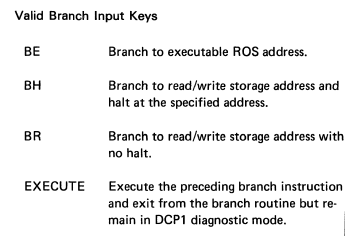
- Once in “DIAG DCP” you continue to use “A” (Alter) and “D” (Display) commands, as well as now the “BE” “BH” “BR” commands. (BE runs code in the Executive ROS, BH lets you run and then halt on a specific address, and BR runs code in RWS main memory).
These commands are described in the IBM 5100 MIM as follows:


Here is what the ALTER command looks like:


When in the DIAG DCP mode, these additional commands are available:

Also, while in DIAG DCP mode, there is the “C” Call command. “C 5” means press “C” then “CMD-5” to run the 5th preprogrammed diagnostics command. The available Call commands are:


NOTE: In the IBM 5100 MIM 3-71 example for Altering Storage Size, I believe it describes a process for how to return to the BASIC/APL after entering DIAG DCP mode:
- CMD-HOLD, CMD-MINUS (as normal to enter DCP DIAG)
- (perform Alter or Display as needed)
- Press SPACE to return to the normal DCP DIAG prompt
- Press CMD-MULTIPLY (*) for BASIC, or CMD-x (multiply) for APL
- Enter “BE” (Branch Execute)
- Enter “1200” (for BASIC) or “8000” (for APL)
IBM 5110 Notes


The process for entering the DCP on the IBM 5110 is similar to the 5100, but not identical.


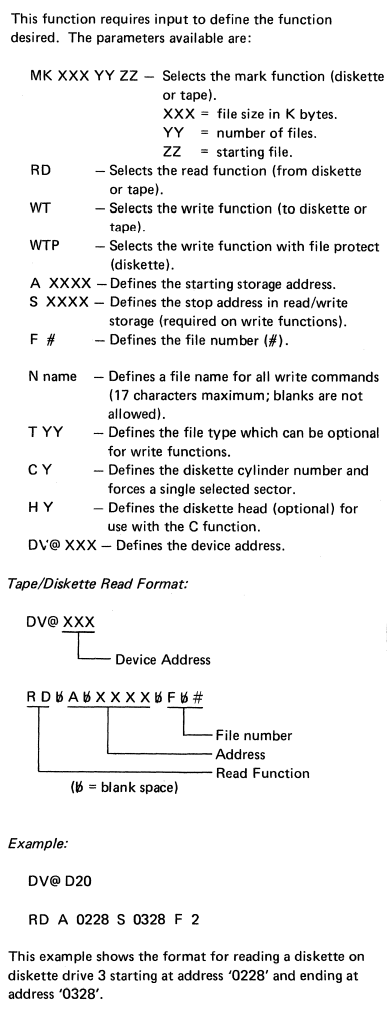
Also note that, compared to the IBM 5100 DCP, the Call programs #8 and #9 are “missing” in the DIAG DCP. These were the utilities to store/load a dump of RWS memory to tape. The IBM 5110 equivalent is “C 5” (DCP I/O functions), which is more elaborate than the IBM 5100 version because it has to accommodate both tape and disk support. “C 5” first prompts “DV” which is the “device address” to invoke the subsequent command on. Recall, that is: E80 for internal tape, E40 for internal tape, D80/40/20/10 for the disk drives. You can also invoke a MARK command directly from the DCP. The command format is as follows:

IOCB (Input/Output Control Block)
IOCB is a defined interface to pass certain parameters to standard devices of the system. One prime use-case is an interface to allow both BASIC and APL to save programs to tape or disk. That’s not a native capability of those languages, but the Executive ROS can coordinate a common way for both those languages to perform this function.


The full extent of the available command codes is not well documented.
NOTE: Corti has some of these documented for the 5110.
TBD